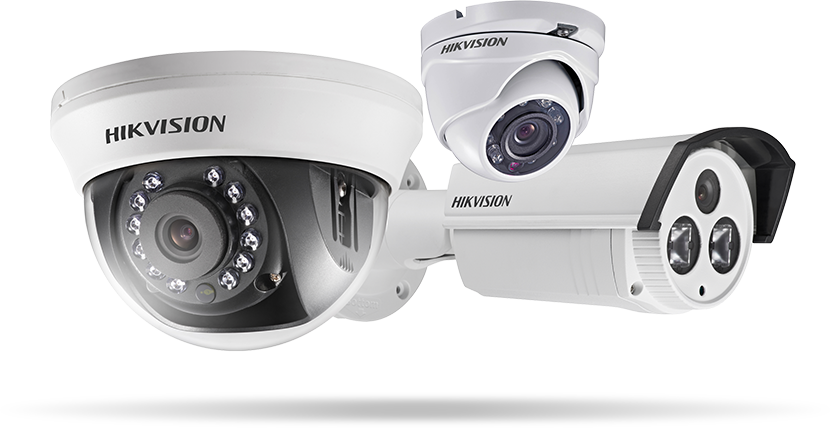
Analogue vs IP CCTV cameras: which suits your home, shop or office?
Analogue cameras record to a DVR over coaxial cable; IP cameras send digital video over network cable to an NVR. How they compare on cabling, recording and remote viewing, and what to ask before you buy.
By the Powercomputers team · 21 November 2026 · 6 min read
The short answer
Analogue cameras send video over coaxial cable to a DVR (digital video recorder), which records it. IP cameras turn the picture into network data and send it over Ethernet cable to an NVR (network video recorder), often drawing their power through the same cable. Analogue suits smaller sites and buildings that already have coaxial cable; IP suits new installations, larger sites and plans to add cameras later. Both can be watched on a phone once the recorder is online.
Key points
- Analogue cameras use coaxial cable and a DVR; IP cameras use network cable and an NVR.
- Hybrid DVRs accept IP cameras too, which helps when upgrading in stages.
- IP cameras can take power over the network cable (PoE), so each camera needs only one cable.
- A copper network run is limited to 100 m; HD analogue over coaxial cable can reach further.
- How many cameras a recorder takes depends on the model, so check its datasheet.
- Remote viewing needs a reliable internet connection and a properly secured recorder.
How an analogue system works
An analogue camera (often spelt analog) captures the picture and sends it as a video signal along coaxial cable to a DVR, which converts it to digital, compresses it and records it to a hard drive. Powercomputers explains it neatly: the camera is the eye and the DVR is the brain.
Today’s analogue cameras are not the grainy systems of the past. HD analogue formats carry high-definition video over coaxial cable: Dahua, for example, describes its HDCVI technology as carrying audio, video, data and power over a single coaxial cable, at resolutions up to 4K.
Each camera needs its own cable run back to the recorder, plus power, either from a separate supply or, on systems that support it, over the coaxial cable itself. The result is simple to understand and to fault-find, which is a large part of its appeal for homes and small shops.
How an IP system works
An IP camera does more of the work itself. It processes the image and sends it as digital data over network cable, such as Cat5e or Cat6, to an NVR or across your network. Powercomputers describes it as an eye with a brain built in.
Many IP cameras can be powered through the network cable using Power over Ethernet (PoE). Axis, for example, notes that its bullet cameras need just one network cable for both power and connectivity. NVRs with built-in PoE ports let cameras plug straight into the recorder, but each has a power budget: Dahua lists 78 W in total across the eight PoE ports of its NVR4108-8P-EI, with up to 25.5 W per port. Check that budget against the cameras you plan to connect.
Because IP cameras sit on a network, they can go wherever there is a network point and are managed like any other network device. That flexibility brings a duty of care: cameras and recorders need strong passwords and up-to-date firmware, just like computers.
Cabling is often the deciding factor
If your building already has coaxial cable from an older system, it may be possible to reuse it with HD analogue cameras and a new DVR, saving the cost and disruption of new cable runs. Ask the installer to test the existing cable first, because old joints and damaged runs cause poor pictures.
Distance matters too. Standard Ethernet allows 100 m of cable between the switch and the camera, as Axis points out, so long runs on a large compound need an extra switch, a PoE extender or fibre. HD analogue can run further over coaxial cable: Dahua’s datasheet for one of its HDCVI recorders quotes up to 800 m at 1080p.
For a new building or a full refit, network cable is usually the more future-proof choice, because the same structured cabling can also carry computers, Wi-Fi access points and biometric terminals.
Recording, storage and smart alerts
DVRs and NVRs both record to internal hard drives. How many days of footage you keep depends on the number of cameras, the resolution, the frame rate, whether you record continuously or only on motion, the compression used and the size of the drives. Newer compression cuts the storage each camera needs: Dahua, for example, says its H.265+ codec reduces bit rate and storage compared with the older H.264, so ask which compression a recorder supports.
Smart detection is no longer only an IP feature. Some current hybrid DVRs analyse motion to tell people and vehicles apart: Dahua’s datasheet for one such recorder describes alerts sent only when a person or vehicle intrudes, and filtering of false alarms caused by animals, rustling leaves and bright lights.
If you need particular features, such as reading number plates or recognising faces, check the datasheets of the actual camera and recorder. Features vary from model to model, so the camera type alone does not tell you what you will get.
How many cameras can one recorder take?
Recorders are sold in different channel counts, and the number of cameras one unit supports depends entirely on the model. Hybrid recorders add another variable: Dahua’s DH-XVR5108H-4KL-I2, for example, has eight analogue inputs and can take IP cameras as well. So rather than relying on a general figure, choose a recorder to fit your camera plan, with spare channels for growth.
Also compare the incoming bandwidth the recorder can handle, the number of hard drive bays and, for a PoE NVR, how many PoE ports it has and how much power they supply.
Watching your cameras remotely
Both DVRs and NVRs can be viewed away from the premises once the recorder is connected to the internet. The manufacturer’s app does the work: Hikvision’s Hik-Connect app, for example, offers live view, remote playback of recorded footage and event notifications for DVRs, NVRs and network cameras, over Wi-Fi or mobile data, and lets you share a device with other users.
Remote viewing depends on the upload speed at the site, so a reliable connection matters more than a headline download figure. It also connects the recorder to the internet, so change default passwords, keep firmware updated and give each person their own login rather than sharing one.
Which suits a home, a shop or an office?
There is no single right answer, but a few questions usually make the choice clear.
- Home or small shop with existing coaxial cable and a handful of cameras: HD analogue with a DVR is often the simplest upgrade.
- New office, warehouse or multi-storey building: IP cameras on structured network cabling leave the most room to grow.
- Long outdoor runs on a large compound: consider HD analogue, fibre links or extra switches, since a copper network run stops at 100 m.
- Phased upgrade: a hybrid recorder lets you keep working analogue cameras while adding IP cameras over time.
- Before buying, list what each camera must see (faces, number plates or a general view), where footage will be watched, how many days must be kept and who needs access.
How Powercomputers can help
Powercomputers supplies CCTV equipment, cameras and monitors, all professionally configured, and offers both analogue and IP security cameras. Its security technicians carry out full installation and IP address setup, and set up the viewing app on phones, iPads, laptops and PCs.
All of its DVR units are capable of off-site monitoring over a fibre or ADSL connection. For ongoing care, Powercomputers’ annual maintenance contracts cover CCTV operation alongside computers, servers, alarm systems, biometrics and photocopiers.
Frequently asked questions
Yes, if the recorder supports both. Hybrid DVRs accept HD analogue cameras on their coaxial inputs and IP cameras over the network. Check the model’s datasheet for how many of each it takes.
Not necessarily. HD analogue formats carry high-definition video over coaxial cable, and some support up to 4K. Picture quality depends on the specific camera, lens, lighting and recorder settings, so compare models rather than types.
No. A DVR or NVR records to its own hard drives on site. You need an internet connection only to watch cameras or receive alerts away from the premises.
For IP cameras on copper network cable, standard Ethernet allows 100 m between the switch and the camera; beyond that you need another switch, a PoE extender or fibre. HD analogue over coaxial cable can go further, depending on the format and resolution, so check the datasheet.
It depends on the model. Recorders come in different channel counts, and hybrid models can add IP channels to their analogue ones. Choose a recorder with spare channels for future cameras.
Sources
This guide was written from these pages:
- Powercomputers: Security Solutions
- Powercomputers: Technical Repair Solutions (annual maintenance contracts)
- Dahua Technology: HDCVI Technology
- Dahua Technology: DH-XVR5108H-4KL-I2 penta-brid DVR datasheet (PDF)
- Dahua Technology: NVR4108-8P-EI 8-channel PoE network video recorder
- Axis Communications: Bullet cameras
- Axis Communications: AXIS T8129 PoE Extender
- Hikvision: Hik-Connect Android Mobile Client help