Biometric time and attendance: how it works and what to look for
A biometric terminal records who clocked in and when, using a face, fingerprint, card or PIN. How the system works, how attendance differs from door access, how it feeds payroll and what to check before buying.
By the Powercomputers team · 21 November 2026 · 6 min read
The short answer
A biometric attendance system records when each employee arrives and leaves by identifying them at a terminal, using a face, a fingerprint, a card or a PIN. Each clock-in is stored with a time stamp, collected by attendance software over the network or by USB, and turned into hours worked, lateness and overtime that can feed payroll. Because a face or fingerprint cannot be handed to a colleague the way a card or PIN can, it is much harder for one person to clock in for another.
Key points
- Each employee enrols once; after that, a quick scan identifies them at the terminal.
- Face, fingerprint, card and PIN each have trade-offs, and many terminals support several.
- Attendance terminals record time; door access terminals also control a lock.
- Records reach the software over the network (TCP/IP) or by USB, and from there can feed payroll.
- Compare capacity, verification methods, connectivity, power backup and support before you buy.
- Tanzania’s Personal Data Protection Act treats biometric data as sensitive personal data.
How a biometric attendance system works
There are three steps. First, enrolment: each employee registers a face or fingerprint at the terminal, and a card or PIN if those are used, and the terminal links it to their staff record. Second, verification: at the start and end of each shift the employee looks at the camera or places a finger on the sensor, and the terminal identifies them and logs the time. Third, collection: the attendance software pulls those logs from the terminal and applies your shift rules.
Speed matters at shift change, when a queue forms at the door. ZKTeco’s datasheet for its MB360 terminal states that user verification takes less than one second.
The software is where raw clock-ins become useful information: hours worked, late arrivals, early departures, absences and overtime, worked out according to the shifts and rules you set.
Face, fingerprint, card or PIN?
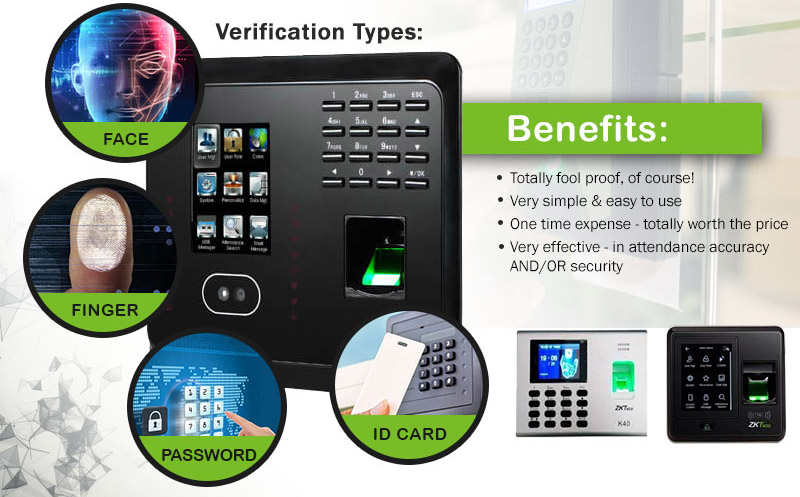
Terminals often support more than one method, and some can require two together for extra assurance. The MB360, for example, supports face, fingerprint, password and card (the card reader is an optional extra on that model), and combinations of them.
- Face: touch-free and quick, useful at busy entrances and where staff often have dirty, wet or gloved hands.
- Fingerprint: well established and widely used, but some fingerprints read poorly, for example when skin is worn or dry, so test enrolment with your own staff.
- Card: fast and simple to issue, but a card can be lent, lost or shared, so it does not prove who is standing at the terminal.
- PIN or password: a useful fallback for a new starter or someone whose fingerprint will not read, but the easiest method to share.
Attendance terminals and door access
A time and attendance terminal records who was present and when. A door access terminal also decides whether to open a door by switching an electric lock, typically at the entrance to a restricted area such as a server room, store or cash office.
The line between the two is not strict. The MB360 and K40 attendance terminals both have connections for a third-party electric lock and an exit button, for simple access control. A dedicated access terminal goes further: ZKTeco’s SF300 works on the network or standalone, can be paired with a second unit so users verify at both entry and exit, supports anti-passback, has a duress alarm and a tamper switch, and can link to a smoke detector or emergency switch so that it raises an alarm and opens the door in an emergency.
For homes and flats there is a third option: biometric smart locks, which work on the door itself without any computer.
Getting attendance into payroll
Attendance data only saves time if it reaches payroll without being retyped. Terminals connect to a computer over the network (TCP/IP), or the logs can be carried on a USB flash drive from sites without a network; the K40 specification sheet also lists reports in Excel format.
The neater route is attendance software that passes hours, lateness, absence and overtime straight into payroll. Powercomputers’ Powerpay payroll software, for example, includes attendance and shift management with support for biometric attendance devices, and lists integration with biometric attendance systems among its features.
Before rollout, agree the rules the software will apply: shift start and end times, any grace period for lateness, how overtime is approved, and what happens when someone forgets to clock out.
What to look for when buying
Compare terminals on the points that affect daily use.
- Capacity: how many faces, fingerprints, cards and records the terminal stores. ZKTeco lists the MB360 at 400 faces, 500 fingerprints and 80,000 records; the K40 sheet lists 1,000 fingerprints and 80,000 records.
- Verification methods: which of face, fingerprint, card and PIN you need, and which are standard rather than optional (the K40 sheet lists cards through an add-in EM card module).
- Connectivity: TCP/IP for networked collection and USB for offline sites; for door access, a Wiegand output lets a terminal such as the SF300 act as a reader for a separate access controller.
- Power backup: a terminal cannot log clock-ins without power. The K40 sheet lists a built-in battery with four hours of backup; for other models, plan a small UPS.
- Environment: the MB360, K40 and SF300 datasheets all give an operating range of 0 to 45°C, so shelter units from direct sun and rain.
- Software and support: who installs it, who trains HR staff, and who to call when a terminal stops syncing.
Biometric data and the law
Tanzania’s Personal Data Protection Act lists biometric data as sensitive personal data. Section 30 says sensitive personal data must not be processed without the prior written consent of the person concerned, subject to listed exceptions, and that consent can be withdrawn at any time without explanation.
The Act also requires anyone who collects or processes personal data to be registered with the Personal Data Protection Commission, to make people aware of the purpose before collecting their data, and to protect it with reasonable security safeguards.
In practice that points to written consent forms, a clear stated purpose such as attendance and access control, restricted access to the attendance software, and a fallback method such as a card or PIN for anyone who withdraws consent. Take legal advice on your own obligations.
How Powercomputers can help
Powercomputers offers a biometric Time and Attendance solution and says it has carried out more than 250 installations across Tanzania. Its site notes that biometrics can be used in offices, factories, banks, hotels and anywhere you need to control time, attendance or access.
For time and attendance it offers the ZKTeco MB360 (face, fingerprint, password and ID card) and K40 (fingerprint, password and ID card); for door access, the SF300 (fingerprint, password and ID card); and for houses and flats, biometric smart locks that need no computer.
Attendance can flow into Powerpay, Powercomputers’ payroll and HR software, which supports biometric attendance devices, and its annual maintenance contracts cover biometrics.
Frequently asked questions
Neither is best everywhere. Face recognition is touch-free and suits busy entrances and staff whose hands are often dirty or gloved, while fingerprint terminals are well established and widely used. Some terminals, such as the MB360, support both, so each person can use whichever works for them.
For collecting clock-ins, yes: terminals such as the MB360, K40 and SF300 store their records and can transfer them by USB. You still need attendance software to turn the records into hours and reports. Biometric smart locks for homes work entirely without a computer.
A terminal cannot log clock-ins without power, so check for backup. The K40 specification lists a built-in battery with four hours of backup; other models can be connected to a small UPS.
Tanzania’s Personal Data Protection Act treats biometric data as sensitive personal data and requires the person’s prior written consent to process it, with some exceptions. Get written consent, explain the purpose, offer a fallback such as a card or PIN, and take legal advice on your situation.
Sources
This guide was written from these pages:
- Powercomputers: Biometrics
- ZKTeco: MB360 multi-biometric T&A and access control terminal datasheet (PDF, via Powercomputers)
- Powercomputers: K40 fingerprint time attendance terminal specification (PDF)
- ZKTeco: SF300 IP-based fingerprint access control and time attendance datasheet (PDF, via Powercomputers)
- Powercomputers: Payroll & HR Management Software
- Powercomputers: Technical Repair Solutions (annual maintenance contracts)
- PDPC: Personal Data Protection Act, 2022 (Cap. 44), English version (PDF)