EFD or VFD? How to choose a fiscal device for your business in Tanzania
An EFD is a physical receipt machine; a VFD is cloud-based software approved by TRA. Here’s how they differ, what TRA’s rules say and how to choose the one that fits the way you sell.
By the Powercomputers team · 21 November 2026 · 7 min read
The short answer
Both are fiscal devices that TRA authorises for issuing fiscal receipts. An EFD is a physical receipt-issuing machine, while a VFD is cloud-based software approved by TRA’s Commissioner General to capture, transmit and keep sales records, with no separate machine. TRA says both serve the same goals, so the choice comes down to how you sell: an EFD suits a counter with no computer system or unreliable power, while a VFD suits a business that already bills through POS, accounting or ERP software, or from an Android device, and can stay online.
Key points
- TRA defines an EFD as an electronic receipt-issuing machine and a VFD as cloud-based software, both approved by its Commissioner General.
- TRA’s guidance requires a fiscal device, bought from an approved supplier, once annual turnover is assessed at TZS 11 million and above.
- Since 2025, every user must connect their fiscal device or billing system to TRA’s EFDMS, and integrated billing systems can issue fiscal receipts.
- An EFD suits a stand-alone counter; a VFD suits sales that already run through software or a phone.
- The regulations require VFD and electronic signature device users to back up their data daily.
- Zanzibar is separate: receipts there go through ZRA’s VFMS, not TRA’s system.
What TRA means by EFD and VFD
The Tax Administration Act defines a fiscal device as an electronic receipt-issuing machine or any other electronic system authorised by the Commissioner General of the Tanzania Revenue Authority (TRA) to be used for business transactions. A fiscal receipt is a receipt or invoice issued by a fiscal device, by the Government electronic payment gateway (GePG) or by another electronic system the Commissioner General approves.
TRA’s EFD/VFD suppliers page sets the two options side by side. An EFD is an electronic receipt-issuing machine authorised by the Commissioner General for business transactions. A VFD is a digital, cloud-based software system approved by the Commissioner General to capture, transmit and keep records of sales data electronically. TRA says both serve the same goals: better business records, less tax evasion, fairer tax assessments, fewer tax disputes and real-time monitoring of business transactions.
In law both are fiscal devices, so either can meet your duty to issue a fiscal receipt. The difference is practical: a machine at the counter, or software that works with the system that already records your sales.
Who has to issue fiscal receipts
Section 44 of the Tax Administration Act (Cap. 438, R.E. 2023) says a person who supplies goods, renders services or receives payment for them shall issue a fiscal receipt. The Commissioner General may publish a list of persons or classes of persons excluded from using a fiscal device or issuing fiscal receipts, and anyone excluded from issuing fiscal receipts must issue a manual receipt instead.
TRA’s guidance sets the practical threshold: a person whose annual turnover is assessed at TZS 11 million and above must acquire a fiscal device from an approved supplier and use it to issue fiscal receipts. TRA’s EFD page also lists the groups brought in during the second phase of EFD roll-out, which began in 2013: traders who aren’t VAT-registered with turnover of TZS 11 million and above a year, traders in a region’s prime areas (identified by the rent they pay), and traders in selected sectors such as spare parts, hardware, mini supermarkets, petrol stations, mobile phone shops, sub-wholesale shops, bars and restaurants, pharmaceutical stores and electronics shops.
Selling online doesn’t take you outside the rules. TRA’s FAQ on online business says that anyone earning income by selling goods or services online must register with TRA, pay tax and issue receipts to customers where applicable, for example with a VFD or EFD.
How an EFD works
An EFD is a dedicated machine. TRA lists four types: the electronic tax register (ETR), used by retail businesses that issue receipts manually; the electronic fiscal printer (EFP), used by computerised retail outlets; the electronic signature device (ESD), which signs invoices produced on a computer; and the electronic fiscal pump printer (EFPP), for petrol stations.
TRA also lists the features that protect EFD records. The fiscal memory can’t be erased by mechanical, chemical or electromagnetic interference, the date mechanism can’t be reversed, each receipt is uniquely identifiable, tax information goes to TRA automatically and a daily Z report is issued every 24 hours. An EFD can work stand-alone or as part of a network, stores data for at least five years and has at least 48 hours of power backup, with the option of an external battery where there is no electricity.
How a VFD works
A VFD has no separate machine. TRA describes it as cloud-based software approved by the Commissioner General to capture, transmit and keep records of sales data. In practice it usually works with the software you already sell from, so the fiscal receipt comes out of the same system that records the sale.
The 2025 amendments to the Tax Administration (General) Regulations spell out how this fits the law. Every user must connect their fiscal device or any billing system to TRA’s Electronic Fiscal Device Management System (EFDMS) and make sure all business transactions are transmitted to it through the fiscal device. A business with accounting software or an automated billing system may continue issuing fiscal receipts from it, provided the system is integrated with the EFDMS and the receipt carries an electronic signature or code approved by the Commissioner General.
Two practical points follow. Because a VFD is cloud-based, it helps to have a dependable internet connection wherever you sell. And the regulations require anyone using an electronic signature device or a virtual fiscal device to back up their data daily and keep the backup in a secure place, so build that into your closing routine.
Matching the device to how you sell
The regulations say each user should use the device suited to the category, operation and type of their business transactions. In practice, a few questions usually settle it.
- No computer at the counter: a stand-alone ETR is the simplest fit.
- Sales already go through POS software: an EFP connected to it, or a VFD, saves keying every sale twice.
- You invoice from accounting software: an ESD, or a VFD integrated with that software, keeps invoicing in one system.
- You run a petrol station: the EFPP is the type TRA describes for petrol stations.
- Power is unreliable: an EFD’s battery backup keeps the counter issuing receipts.
- Several tills, branches or cashiers: software that reports by user and branch makes reconciliation easier.
- You sell from a phone or tablet: look for a VFD that runs on your device.
The same rules apply to both
Whichever route you take, TRA says the device must come from an approved supplier, and you are free to buy from any supplier on TRA’s published list, which shows whether each one is approved for EFDs, VFDs or both.
After purchase the obligations are the same. You may not transfer the device to anyone else or allow another person to use it, it must be kept where customers can easily see or reach it, and if it fails you must report the failure in writing to your supplier and to TRA within 24 hours.
Zanzibar works differently. The Zanzibar Revenue Authority (ZRA) runs its own Virtual Fiscal Management System (VFMS) to generate receipts and monitor sales, and Zanzibar’s Tax Administration and Procedures Act requires anyone operating an electronic system to integrate it with ZRA’s system. If you trade in Zanzibar, follow ZRA’s requirements rather than TRA’s.
How Powercomputers can help
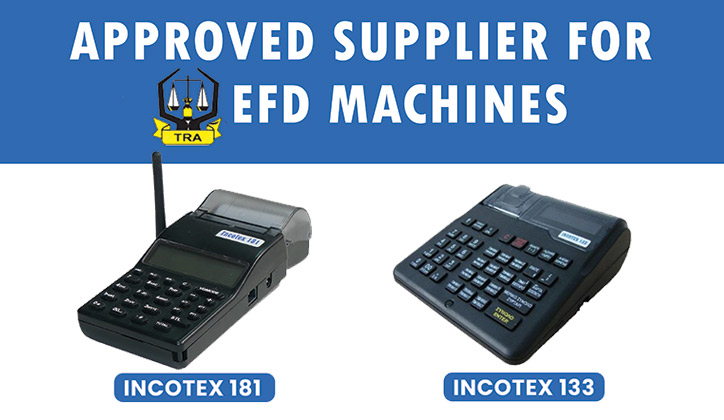
Powercomputers has been an authorised EFD supplier for the Tanzania Revenue Authority since 2013 and is also a TRA VFD integrated partner, so it can help with either route on the mainland. It deals in all types of EFD machines and provides sales and support for Incotex, DATECS and Tremol machines, with trained technicians, free usage training, support over telephone, warranty and services, and free delivery of machines.
POWER VFD is Powercomputers’ own VFD solution. It is compatible with Android devices, Tally ERP, Tally Prime, SAP Business One, Microsoft Dynamics, OMEGA ERP, POWER POS and various customised ERPs, gives reports by user, branch and department, lets you set sale-amount and day limits for each user, and can send sales to other applications through an API. A free Power VFD Android app can be downloaded from Powercomputers’ TRA VFD page, and EFD video tutorials are on its tutorials page.
Frequently asked questions
Yes. Both are fiscal devices under the Tax Administration Act, which covers an electronic receipt-issuing machine or any other electronic system the Commissioner General authorises, and TRA says EFDs and VFDs serve the same goals.
TRA’s guidance applies the obligation from an assessed annual turnover of TZS 11 million. The Act itself puts the duty on anyone who supplies goods or services unless excluded, and TRA’s EFD page also lists traders in prime areas and selected sectors, so confirm your position with TRA.
Yes, if it is integrated. Under the 2025 amendments, accounting software or an automated billing system may issue fiscal receipts when it is integrated with TRA’s EFDMS and the receipt carries an electronic signature or code approved by the Commissioner General.
Zanzibar has its own system. Receipts there go through the Zanzibar Revenue Authority’s VFMS, and Zanzibar law requires electronic systems to be integrated with ZRA’s system, so check ZRA’s requirements.
Sources
This guide was written from these pages:
- TRA: EFD/VFD Suppliers
- TRA: E-Fiscal Devices (EFD)
- TRA: List of approved EFD/VFD suppliers (PDF)
- TRA: Frequently Asked Questions (Online Business)
- TRA: The Tax Administration Act, Cap. 438 R.E. 2023 (PDF)
- TRA: The Tax Administration (General) Regulations, 2016, GN 101 of 2016 (Word document)
- TRA: The Tax Administration (General) (Amendment) Regulations, 2025, GN 352J (PDF)
- Zanzibar Revenue Authority: Virtual Fiscal Management System (VFMS)
- Zanzibar Revenue Authority: The Tax Administration and Procedures Act No. 7 of 2009, consolidated 2025 (PDF)
- Powercomputers: EFD Machines
- Powercomputers: TRA VFD Solution
- Powercomputers: Retail Stores and Wholesalers