Types of EFD machines in Tanzania: ETR, EFP, ESD, EFPP and VFD explained
TRA recognises four types of electronic fiscal device, plus the software-based VFD. Here’s what each one does, which businesses it suits and the rules that come with every type.
By the Powercomputers team · 21 November 2026 · 6 min read
The short answer
TRA lists four types of electronic fiscal device: the electronic tax register (ETR) for retail businesses that issue receipts manually, the electronic fiscal printer (EFP) for computerised retail outlets, the electronic signature device (ESD) that signs invoices produced on a computer, and the electronic fiscal pump printer (EFPP) for petrol stations. The virtual fiscal device (VFD) does the same job as cloud-based software, with no physical machine. The regulations say each business should use the device that suits the category, operation and type of its transactions.
Key points
- ETR: a stand-alone register for counters that issue receipts manually.
- EFP: connected to a computer network, it stores every sale in its fiscal memory.
- ESD: adds a unique signature to invoices produced by your computer system.
- EFPP: connected to a fuel pump, it prints a receipt for every sale.
- VFD: cloud-based software approved by TRA, with no separate machine.
- Every type comes from a TRA-approved supplier and carries the same user obligations.
One duty, five ways to meet it
Under the Tax Administration Act, a fiscal device is an electronic receipt-issuing machine or any other electronic system authorised by the Commissioner General of the Tanzania Revenue Authority (TRA). TRA defines an electronic fiscal device (EFD) as a machine designed for use in business for efficient management controls in sales analysis and stock control, which conforms to the requirements of the law.
TRA’s EFD page describes four types of EFD, and its suppliers page adds the virtual fiscal device (VFD). All five issue fiscal receipts, and the regulations require each user to use the device suitable to the category, operation and type of their business transactions. In practice the right type depends less on the size of your business than on how your sales are recorded: by hand at a counter, through POS or accounting software, at a fuel pump, or on a phone.
Electronic tax register (ETR)
TRA says the ETR is used by retail businesses that issue receipts manually. It is the self-contained option: the cashier enters each sale on the machine and it issues the fiscal receipt, with no computer involved.
Who it suits: shops, kiosks, bars and stalls where staff serve at a counter and there is no POS or accounting software to connect to. Because it doesn’t depend on a computer, it keeps working when the office PC doesn’t, and TRA notes that EFDs have at least 48 hours of power backup and can use an external battery where there is no electricity.
What to watch: every sale is keyed in by hand, so any stock records sit in a separate book or system. If you plan to computerise soon, compare an EFP or a VFD before you buy.
Electronic fiscal printer (EFP)
TRA says the EFP is used by computerised retail outlets. It is connected to a computer network and stores every sale transaction in its fiscal memory, so each sale is recorded once in your system and the fiscal record is kept by the printer.
Who it suits: supermarkets, mini markets, pharmacies and other outlets that already sell through POS software, often with barcode scanning, where cashiers shouldn’t have to enter a sale twice.
What to watch: the printer and your POS software must work together, so ask the supplier and your software provider to show the two running together before you pay.
Electronic signature device (ESD)
TRA describes the ESD as a device that authenticates, by signing, any financial document produced on a personal computer, such as a tax invoice. It uses a special computer program to generate a unique number, the signature, which is appended to and printed on every invoice issued by the user’s system. The regulations describe it as a record-signing device used with the computer that runs the accounting software.
Who it suits: businesses that sell on invoice rather than over a counter, such as wholesalers, distributors and service firms whose invoices come out of accounting or billing software.
What to watch: the regulations require ESD users to back up their data daily on the computer the device is connected to and store the backup in a secure place, so make it part of the end-of-day routine.
Electronic fiscal pump printer (EFPP)
TRA says the EFPP is designed for use in petrol stations. It is connected to a pump and prints a receipt for every sale transaction. Petrol stations were also among the sectors TRA named when it extended EFD use to more traders from 2013.
Who it suits: fuel retailers, where each sale is dispensed and measured at the pump.
What to watch: payment rules are changing at the forecourt. Under the Electronic Transactions (Mandatory Electronic Payments for Specified Transactions) Order, 2026, in operation from 1 July 2026, payment for goods or services at filling stations must be made or received electronically, for example by mobile money, payment card or point of sale device. Businesses already receiving such payments were given six months to put electronic payment in place, so plan how pump receipts and electronic payments will be matched.
Virtual fiscal device (VFD)
A VFD replaces the machine with software. TRA defines it as a cloud-based digital system approved by the Commissioner General to capture, transmit and keep records of sales data electronically. Under the 2025 amendments to the regulations, accounting software or an automated billing system may issue fiscal receipts directly, provided it is integrated with TRA’s Electronic Fiscal Device Management System (EFDMS) and the receipt carries an electronic signature or code approved by the Commissioner General.
Who it suits: businesses that already bill through POS, ERP or accounting software, businesses with several tills or branches, and sellers who want to issue receipts from a phone or tablet.
What to watch: the regulations require VFD users, like ESD users, to back up their data daily and keep it secure. And because a VFD is cloud-based, it helps to have a dependable internet connection wherever you sell.
Rules that come with every type
Whatever type you choose, the same obligations follow from TRA’s guidance and the Tax Administration (General) Regulations.
- Buy from a TRA-approved supplier; you may choose any supplier on TRA’s list.
- Issue a fiscal receipt for every sale, and keep the device where customers can easily see it.
- Don’t transfer the device to anyone else or let another person use it.
- If it fails, report it in writing to your supplier and to TRA within 24 hours; the supplier must fix it within 48 hours of the report.
- Manual receipts are allowed only temporarily, for example while the device is under maintenance or has failed and been reported, and must be entered into the device once it works again.
- Keep the records in the device for five years.
How Powercomputers can help
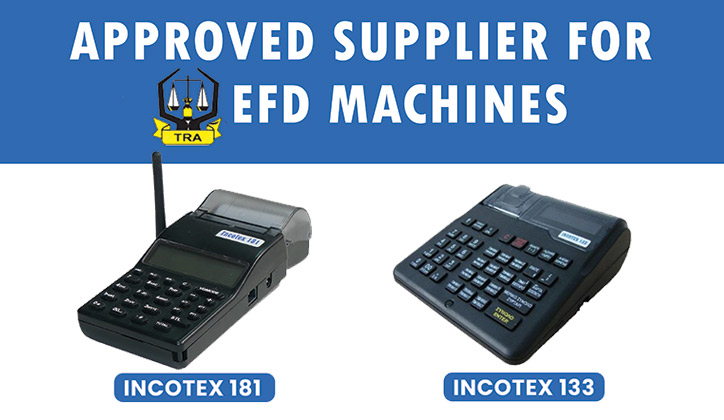
Powercomputers deals in all types of EFD machines and has been an authorised EFD supplier for the Tanzania Revenue Authority since 2013. It provides sales and support for Incotex, DATECS and Tremol EFD machines, and its EFD offer lists trained technicians, free usage training, support over telephone, machines for all types of customers, warranty and services, and free delivery of machines.
If software suits you better, POWER VFD is Powercomputers’ own VFD solution, compatible with Android devices, Tally ERP, Tally Prime, SAP Business One, Microsoft Dynamics, OMEGA ERP, POWER POS and various customised ERPs. Its EFD video tutorials give step-by-step guidance on using the machines, and a free Power VFD Android app can be downloaded from its TRA VFD page.
Frequently asked questions
If you serve at a counter without POS software, the ETR fits TRA’s description: it is used by retail businesses that issue receipts manually. If you already sell through POS software, an EFP or a VFD saves entering each sale twice.
An ESD is a physical device that adds a unique signature to invoices produced by your computer system. A VFD is cloud-based software with no separate device. The regulations require users of either to back up their data daily.
TRA’s type for petrol stations is the electronic fiscal pump printer (EFPP), which is connected to a pump and prints a receipt for every sale.
Only from a TRA-approved supplier. TRA publishes its list of approved EFD and VFD suppliers, and you may buy from any supplier on it.
Sources
This guide was written from these pages:
- TRA: E-Fiscal Devices (EFD)
- TRA: EFD/VFD Suppliers
- TRA: List of approved EFD/VFD suppliers (PDF)
- TRA: The Tax Administration Act, Cap. 438 R.E. 2023 (PDF)
- TRA: The Tax Administration (General) Regulations, 2016, GN 101 of 2016 (Word document)
- TRA: The Tax Administration (General) (Amendment) Regulations, 2025, GN 352J (PDF)
- TRA: The Electronic Transactions (Mandatory Electronic Payments for Specified Transactions) Order, 2026, GN 158C (PDF)
- Powercomputers: EFD Machines
- Powercomputers: TRA VFD Solution
- Powercomputers: EFD Video Tutorials